SysChat is a free online computer support community. Ask questions, share resources, contribute knowledge and discuss technology. Join our growing community to access all features. Register Now!

SysChat » Tutorials and Tips 'n' Tricks » Tips 'n' Tricks » How to print your system info on paper
Tips 'n' Tricks Share your computer hardware, software, games related tips 'n' tricks that you've come across.


Reply
 
LinkBack Tip Tools
 

How to print your system info on paper

By Sami
06-21-2006
To print your system info on paper please follow the steps below.

1. Right click on the My Computer Icon -> select "Properties"
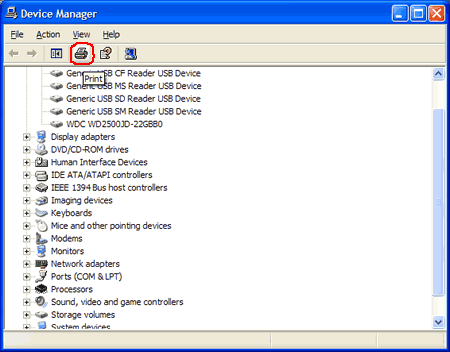
2. Select -> Hardware tab -> Click Device Manager button -> then click Print Button.
3. In the print window under Report type box Select "All devices and system summary" then click on Print button.
4. This will give a print-out of information about your hardware, ports, memory usage, devices and drivers.
Reply


Tip Tools

Posting Rules
You may not post new tips
You may not post
You may not post attachments
You may not edit your posts

vB code is On
Smilies are On
[IMG] code is On
HTML code is Off
Trackbacks are Off
Pingbacks are Off
Refbacks are On


Bookmark and Share    RSS Feed Button
» Sponsors




